Redesigning and automating Practice Makes Perfect's manual process to streamline the business workflow in the digital space.
Practice Makes Perfect (PMP) partners with NYC public schools to help inner-city youth students build confidence in their academic and leadership skills through in-person tutoring. I had the opportunity to work on redefining the user experience of Practice Makes Perfect’s business model to help them better achieve their mission.

The Overview
Timeline
3 Sprints
My Role
User Research, Prototyping, Concepting, Wireframing
Impact
-Streamlined and digitized business's manual process.
-Increased accountability between employees.
-Created student reporting system.
-Allowed client to collect real-time data through student reports.
The Challenge
Designing for Automation
PMP experienced many growing pains after expanding from a single season program to a full year curriculum.
This new model outpaced their existing infrastructure, where even simple administrative tasks such as tracking attendance or tutor reports became too cumbersome as the organization scaled. With only 7 admins to track 150 tutors, the challenge PMP faced was one of optimizing then digitizing their outdated systems into a digital product to increase employee productivity and satisfaction.
The Approach
Starting Bottom Up
And so we got to digging into PMP’s current process to understand what worked and didn't work for them...
Since PMP did not have an existing platform we decided that to design a meaningful and tailored product for our clients, it was crucial to start at the bottom to find out their needs by understanding the client’s current process, analyzing current tools, and identifying the pain points they encounter on a daily basis.
But before we dove into researching, our team thought it was important to address two principles with our stakeholders to get the most meaningful information we needed:

Stakeholders are also users
Because the stakeholders in this company are also the admins and are as involved in the company’s internal logistical tasks, we decided to interview them as our users to get a wide-view of pain points and understand different working processes. It also allowed us to gain better feedback and buy-in for features since the stakeholders also felt like their voices were being heard.

Open communication to build trust
Keeping an open line of communication with our client was pertinent in order to make sure we were all on the same page. We were also transparent in our research and design methods so that we could provide a holistic and seamless client experience, including making sure their employees’ interviews were kept anonymous to prevent any unpredictable consequences.
The Discovery
A Process of
Elimination
Digging through existing tools
We found that PMP employees were using around 7 different tools to do their everyday tasks such as communicating, clocking-in, writing session reports, taking attendance, and scheduling. The myriad of tools resulted in a disorganized system that lacked accountability and employees juggling various tools to keep up.
Through this preliminary research, we wanted to see which tools were essential and also highlight some key features that could potentially help simplify the day-to-day process.

About 3-4 different tools were used simultaneously just to communicate between the tutors and the admin team: everything from excel spreadsheets, emails, even as pictures through a text message. It would then be up to the admins to reformat and organize everything.
Understanding Painpoints and Common Needs

Through our in-person interviews with PMP employees, we made sure to ask open-ended questions in order to hear about each persons' personalized accounts and stories. This not only gave us an understanding about their painpoints, goals and motivations, but it also allowed us to see the big picture of the overall business workflow through these various roles.
We found that Practice Makes Perfect's employees can be broken down into the three main roles:
(Tutor who manages the other tutors on site)
It was clear that PMP employees loved working with students and showed a passion in their work to create a difference in students’ lives. But, when we asked key open-ended questions like, “What does a successful day vs. an unsuccessful day looks like to you?”, it was clear they were overwhelmed where there were insufficient resources or no set process in the system.
Our insights showed the common pain-points shared by all employees included:

The Problem
How can we redesign the current system so that PMP employees can increase their overall productivity?
How and Why
Changing the problem statement into a problem question and asking the "How" and "Why" allowed me to become curious and visualize the ideal end-to-end experience for the users. This helped identify issues that might prevent PMP currently, from having that experience. Starting off with the higher-level thinking helped us dive into ideas and concepts, which then evolved into tangible solutions to best answer the problem question.
We went back to the pain-points, and through an affinity mapping exercise, saw that there was an overarching theme of inconsistent daily reporting, communication issues, and a lack of accountability.
Scoping Down

We prioritized our persona to the site location leader as they are the middleman in the overall business workflow and considered how this prioritization would affect the other roles in the design of the final product.
This allowed us to further identify role responsibilities and improve on broken links or holes in the system during this re-structuring process.
Objectives
Focusing on
the Goals
In order to address the challenges, we took a step back to see the bigger picture of goals that our product should be solving for. Keeping these design principles in mind throughout our process made sure we had our end users' needs in mind, and also helped us stay on track to achieve our client’s business objectives.


Accountability =
Happy Employees
The Accountability Factor
Emphasis on “accountability” is important here since this is the net that catches most of the issues the client was facing. The previously mentioned challenges such as inconsistent reporting, attendance, communication, and schedule changes all stemmed from the unreliable manual process and the disconnect between employees that comes with it.
This meant streamlining and digitizing PMP’s internal system so that tutors, school location leaders and admins could stay accountable automatically, would cut down unnecessary manual process time and being overwhelmed and increase productivity with students and business goals, while also building trust and transparency between the admin side and tutors.
Ideation and Validation
Testing it Out
For our initial design phase, we started out by sketching out various concepts grounded in areas with the biggest painpoints. Rapid sketching was important for us to come up ideas and get quick feedback and validation in order to narrow down given the time constraint we were faced with.
Using the 'think-out-loud' method, we conducted two rounds of testing with 6 participants. The first round of concepts tested out features and A/B testing with versions of the progress reporting format and then translated the ones that had positive feedback into low fidelity wireframes. Our second round of usability testing was to test the user-flows and refine it through iterative wireframe/prototyping. We converged the designs with the most positive feedback.
Although our concepts were focused primarily on the site location leader user , we thought it was important to test it on the different main roles of Practice Makes Perfect since all roles depend on each other.


Introducing...
Practice Makes Perfect App
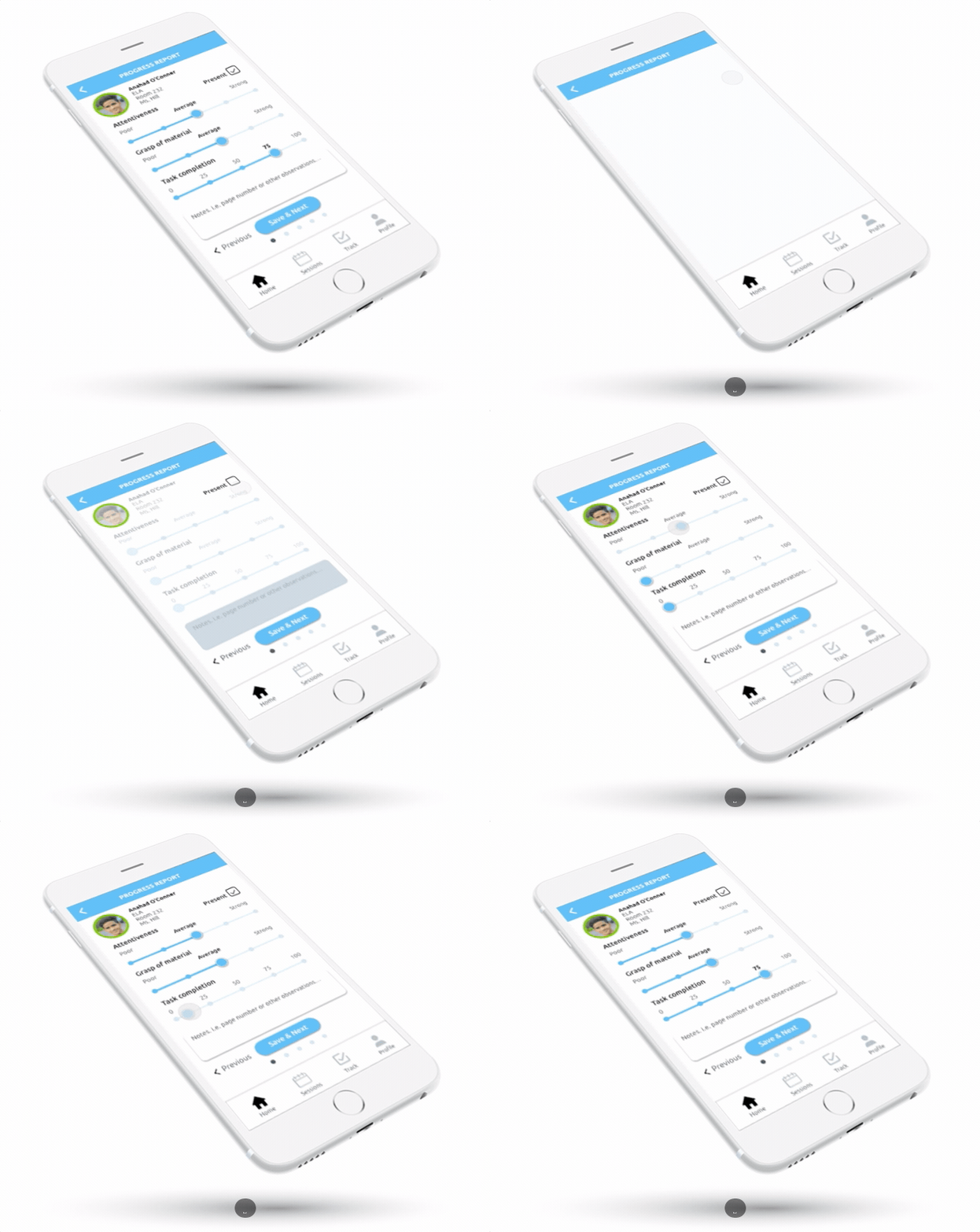
Easier and faster reporting
We decided on a simple template format in which qualitative data can become quantifiable so the data could easily be sent to the back-end so admins can track this data in graphs.
By having the users drag or click on sliders under each category, condenses the amount of time they have to take to fill out reports on students.


To save time and encourage tutors to complete reports all at once, we decided on a “slide” interaction so when tutors tap “Save & Next”, it will automatically slide to the next student’s screen.
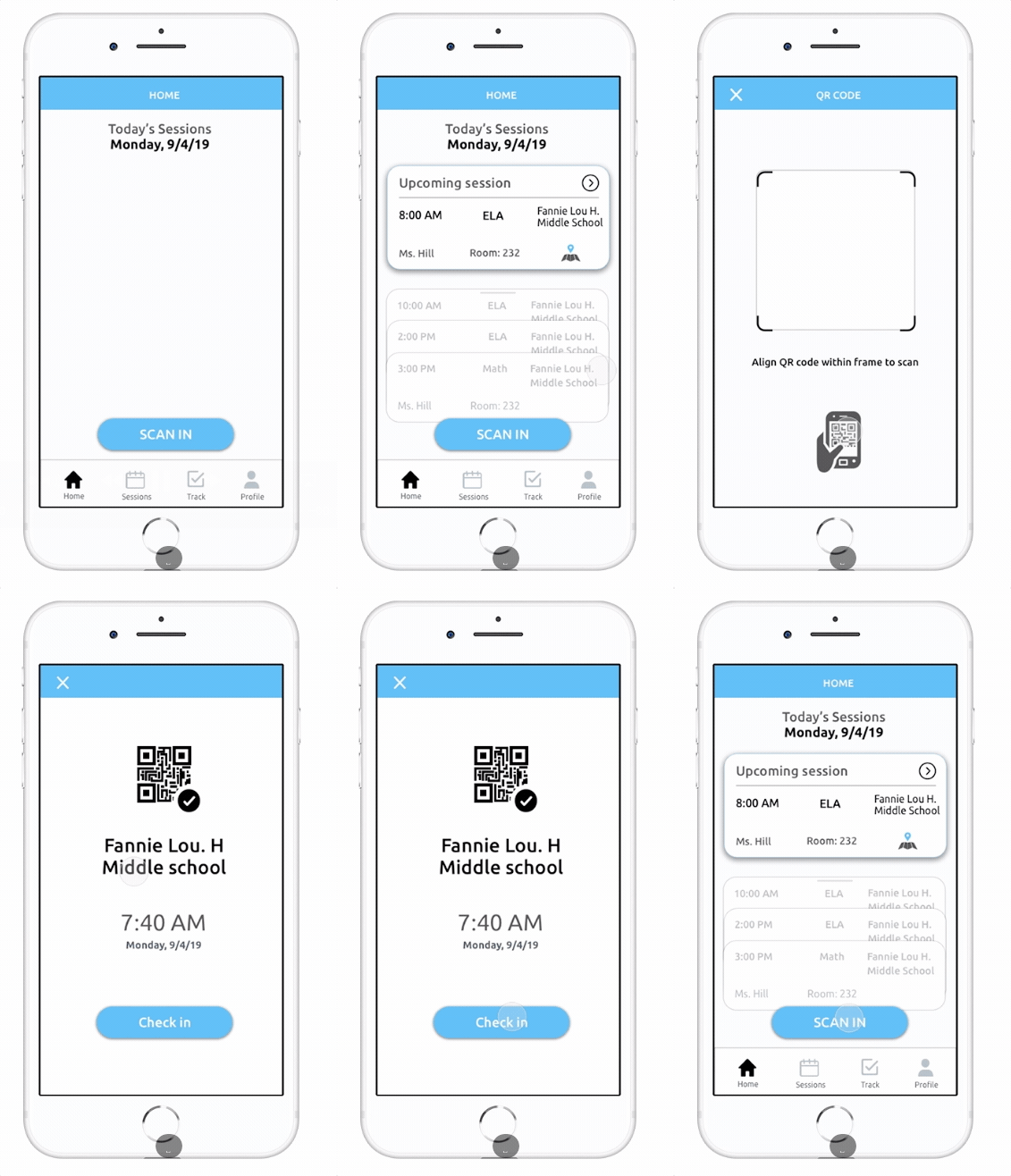
A more reliable check in
One of the challenges we faced was finding a solution to tutor attendance and lateness since we had a find a better solution than the current third party app had issues with.
We decided on a QR code check-in where tutors will have to scan the designated school's code before they start their sessions. This overcomes the issue of tutors being able to clock-in outside of the school and allows a more reliable and internal way for admin and leaders to check in on the tutors' attendance.
Automatized accountability
One of the main goal for this app was to increase our users' overall productivity and accountability. Instead of making Site Location Leaders physically run around to check if late tutors arrived and track whether all their tutor's submitted the progress report, we made the app manage that job for them.
Everytime a tutor has scanned into the school and submitted their session report, the check marks will turn blue next to their name.

To keep the system more streamlined, Site Location Leaders will be responsible for making sure their tutors have signed in and submitted the progress report before completing the session. Admins will have access to this information once the leaders have pressed "Complete Session".
Calendar
Through a calendar feature on the app, tutors can see when their session schedules ahead of time and also see updates on when NYC public schools have holidays, so diminishes the unnecessary communication from admins announcing when schools are closed or have snow days. The calendar will be in sync with each tutors' schedule and also the NYC public school schedule.

What's Next?
Validation Through More Testing
We received many positive feedback form our stakeholders and users with the app. However, due to the tight deadline we were not able to create user accounts for the admins and the general tutors. We realize that based on the responsibilities of each role, the features will also vary. Our next step would be to conduct more testing with the Site Location Leader account to see research on what the synthesized data from the progress reports and attendance will look like.
Overall, our team enjoyed working with participants who were more than willing to help create an efficient and seamless product.